
Outscraper Review 2026: Pricing, Features, and Our Head-to-Head Test

By Shane Daly, Content Writer at Lead Scrape
Last updated
Outscraper is a cloud-based Google Maps scraper. It charges $3 per 1,000 results on a pay-per-use credit model, and email and contact enrichment cost extra on top of that. It holds a 4.4/5 average across 283 Trustpilot reviews. The closest alternative is Lead Scrape, a desktop app licensed at $97 or $247 a year for unlimited searches, with email verification built in.
TL;DR
- Outscraper runs in the cloud and scrapes Google Maps, Search, Reviews, Shopping, and a handful of non-Google sources.
- The base rate is $3 per 1,000 results, charged as credits. Emails, phone numbers, and contact data are billed on top.
- You get business name, address, phone, website, and ratings. Email verification is a separate paid add-on.
- Lead Scrape covers the same listings plus verified emails, tech stack, and SEO metrics for $247 a year with no usage caps.
- We ran both tools on the same live search. Jump to our head-to-head test for the exact times, result counts, and the real bill.

What Is Outscraper?
Outscraper is a cloud-based data extraction platform, founded in 2018, that scrapes business listings and contact data from Google Maps, Google Search, Google Reviews, and Google Shopping. Billing is pay-as-you-go at $3 per 1,000 base results (per Outscraper's pricing page, accessed July 2026), with email enrichment and contact data charged as separate add-ons.
Coverage extends well past Google. Outscraper also reaches social platforms including Facebook, Instagram, LinkedIn, and YouTube, e-commerce sites like Amazon, and more than 50 other public data sources. Teams mostly use it to build lead lists, gather location data, or fill gaps in records they already hold. There are no monthly fees or forced subscriptions. You buy credits as you go.
The Google Maps scraper is their flagship app. It pulls business names, addresses, phone numbers, websites, ratings, categories, and coordinates. You run jobs from the no-code dashboard at app.outscraper.cloud, or automate them through the API with single-key authentication and webhook callbacks. Real-time per-result lookups exist on a smaller set of endpoints at higher cost, but most jobs run in batch. Outscraper handles IP rotation, proxies, and the anti-bot side for you. Output comes back as CSV, XLSX, JSON, or Parquet.
There is no Chrome extension, you work in the dashboard or through the API. Small jobs finish in one to five minutes, while a run of 50,000 records or more can take hours. Billing is granular, so you only pay for records that come back with data, but anything past the base scrape (emails, contact details, other enrichments) bills as separate credits.
What does Outscraper integrate with?
Outscraper reaches other tools through its REST API, and it plugs into Google Sheets, Zapier, Make, and N8N. There are no built-in CRM connectors. Getting records into HubSpot, Salesforce, or Pipedrive means middleware or your own API calls. Lead Scrape ships with native connectors for HubSpot, GoHighLevel, Pipedrive, Instantly, Smartlead, Lemlist, Umbrella, and Woodpecker, which you set up once and forget about.
How does the Outscraper API work?
Developers work with Outscraper through a REST API that uses single-key authentication. A typical call to scrape Google Maps listings looks like this:
import requests

response = requests.get(
    "https://api.app.outscraper.com/maps/search-v3",
    params={"query": "plumbers in Austin TX", "limit": 100},
    headers={"X-API-KEY": "YOUR_API_KEY"}
)
Every successful result costs credits at the $3 per 1,000 base rate, and enrichment fields are billed separately. Lead Scrape has no equivalent meter, so you run searches in the desktop app with nothing billed per call, then export as CSV, Excel, or JSON, or push the results straight into other apps through its CRM integrations and webhooks.
How Do Outscraper and Lead Scrape Compare?
Feature by feature, most of the gap comes down to what each price already includes, because anything outside it is billed by the record.
| Feature | Outscraper | Lead Scrape |
|---|---|---|
| Pricing Model | Pay per use ($3 / 1,000 results) | Flat rate ($247/year unlimited) |
| Annual Cost (30K results/mo) | $1,080+ | $247 |
| Data Sources | Google Maps | Multiple business directories |
| Email Extraction | Extra fee | Included |
| Email Verification | Extra fee | Included |
| Tech Stack Data | Extra fee | Included |
| SEO Stats | Not available | Included |
| Company Size & Revenue | Extra fee | Included (revenue: Business edition) |
| Export Formats | CSV, XLSX, JSON, Parquet | CSV, Excel, JSON, CRM integrations, Webhooks |
| Desktop / Cloud | Cloud-based | Desktop app (Windows & Mac) |
| Free Tier | Limited free quota | Free trial |
Table data verified against Outscraper's pricing page and Lead Scrape feature list on 2026-07-07.
How Much Does Outscraper Cost?
The base rate is $3 per 1,000 scraped results, according to Outscraper's published pricing (accessed July 2026). Email enrichment, contact names, and company data are billed as separate per-credit add-ons. One credit buys one scraped result on the base tier, but each add-on burns more credits per record, which makes a monthly figure hard to forecast. Of the 26 one- and two-star Trustpilot reviews on the profile when we checked it on 1 August 2026, one is titled "be aware of huge invoices and price intransparency" and another "Charges without a warning".
Lead Scrape bills the opposite way, at $247 for the whole year, with emails, tech stack data, and verification included and no limit on how much you scrape. Breakeven lands near 7,000 results a month, above which the flat fee is cheaper.
We call the point where Outscraper's per-result billing overtakes that flat annual fee the Break-Even Line, and it shifts depending on how much enrichment you switch on. Plain listings at $3 per 1,000 put the line near 7,000 results a month. Switch on emails and contacts and the effective rate climbs to roughly $8 per 1,000, which drags the line down to about 2,600. The full enrichment stack works out near $13 per 1,000, and the crossover falls to roughly 1,600 a month. Pay-per-use is cheaper underneath whichever line applies to you, and the $247 flat fee pulls further ahead every month once you cross it. The formula is 247,000 divided by (12 times the per-1,000 rate).
| Monthly results | Outscraper annual cost (base $3/1K) | Lead Scrape annual cost | Annual savings with Lead Scrape |
|---|---|---|---|
| 5,000 | $180 | $247 | -$67 (Outscraper cheaper at this volume) |
| 10,000 | $360 | $247 | $113 |
| 30,000 | $1,080 | $247 | $833 |
| 50,000 | $1,800 | $247 | $1,553 |
| 100,000 | $3,600 (about $1,200 at the $1/1K Business tier) | $247 | $3,353 ($953 at the Business tier) |
| 250,000 | $9,000 (about $3,000 at the $1/1K Business tier) | $247 | $8,753 ($2,753 at the Business tier) |
Note: Outscraper figures use the $3/1K Medium tier rate. Outscraper publishes a discounted $1/1K Business tier for accounts above 100,000 records. Emails, phone numbers, and LinkedIn data are separate per-credit add-ons on top of the base rate. Source: Outscraper pricing page, accessed 2026-07-07.
What "$3 per 1,000" really costs once you add emails
The base rate only buys plain business listings. Most sales teams want verified emails and named contacts as well, and that is where the number climbs, because every enrichment lands as a separate line on the bill. The quote below came from a larger job, a restaurants search in Los Angeles, and Outscraper breaks it out service by service.
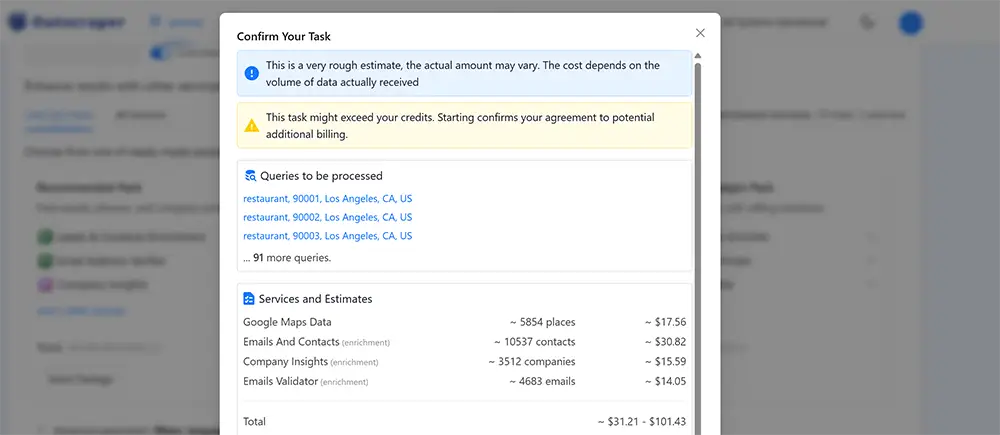
| Service added | Records billed | Cost | Effective rate |
|---|---|---|---|
| Google Maps data (base) | 5,854 places | $17.56 | ~$3.00 / 1,000 records |
| Plus emails and contacts | 10,537 contacts | $30.82 | ~$2.90 / 1,000 records |
| Plus company insights | 3,512 companies | $15.59 | ~$4.40 / 1,000 records |
| Plus email verification | 4,683 emails | $14.05 | ~$3.00 / 1,000 records |
| Total, fully enriched | 5,854 businesses | ~$78 | ~$13 / 1,000 businesses |
Figures read directly from Outscraper's own pre-run estimate on 2026-07-07. The four line items sum to about $78. Outscraper's headline estimate for the same job spans a wider $31 to $101 range, since the final charge depends on how many records actually return data. Each enrichment is billed per record that returns data, not on every business, so the per-record rates above sit near the $3 base while the all-in cost per business rises as you switch more services on.
Attaching emails and contacts roughly triples what you pay per business, from about $3 per 1,000 to closer to $8. Fully enriched, this single 5,854-business job came to around $78, or about $13 per 1,000 businesses. Lead Scrape folds every one of those fields into the flat annual fee, so its effective rate doesn't move with volume or with how many boxes you tick.
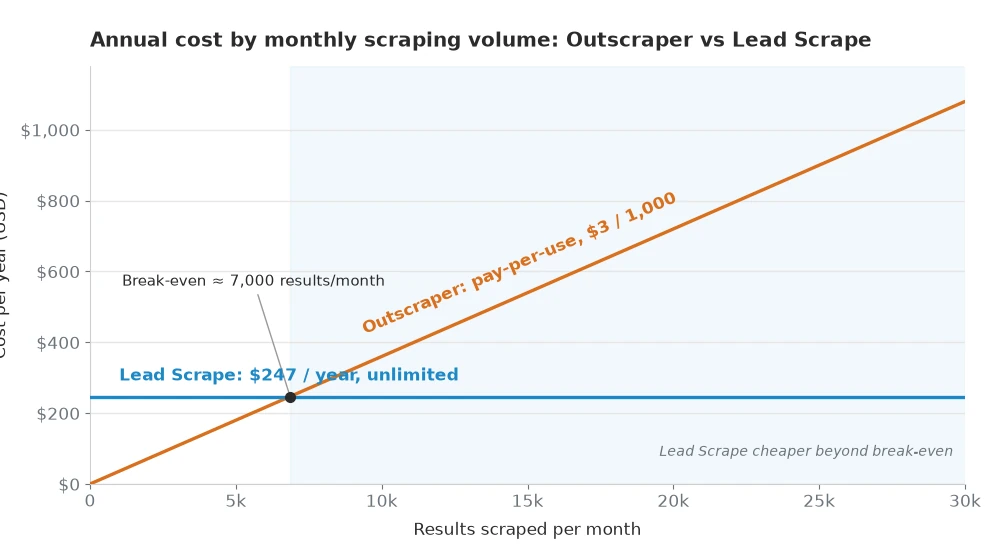
| What you extract | Effective rate | Break-Even Line |
|---|---|---|
| Plain listings | ~$3 per 1,000 | ~7,000 results a month |
| Plus emails and contacts | ~$8 per 1,000 | ~2,600 results a month |
| Full enrichment stack | ~$13 per 1,000 | ~1,600 results a month |
Estimate Your Own Break-Even Line
Type in how many results you pull a month and pick how much enrichment you need. It runs on the same $3, $8, and $13 per 1,000 effective rates from the tables above, measured against Lead Scrape's flat $247 a year.
Estimates use this page's own effective per-1,000 rates and assume you enrich every record, so treat them as a guide, not a live Outscraper quote. Lead Scrape stays a flat $247 a year at any volume.
Which Tool Gives You Better Data?
Both tools pull the core business details (names, addresses, phone numbers, websites, ratings, and categories) from publicly available sources across 50+ countries. A Lead Scrape record arrives fuller, though: technology stack data, company size, SEO metrics, and built-in email verification all come with the license, and the Business edition adds estimated revenue. Outscraper covers the same core fields, then charges separately for email enrichment, contact data, and company details. It also draws on Google Maps alone, where Lead Scrape works across multiple business directories, which usually means wider coverage per search.
As one G2 reviewer put it: "Of all the tools we use, LeadScrape returns the best data to reach out to prospects." There are direct CRM integrations too, so leads land in your pipeline without a manual CSV import in the middle. Outscraper has an API for custom integrations but no built-in CRM connectors. A Capterra review makes the same point about data quality: "Easy to use and the data quality is consistently good across different industries."
We Ran Both Tools Head-to-Head: "Insurance Agency" in Miami, FL
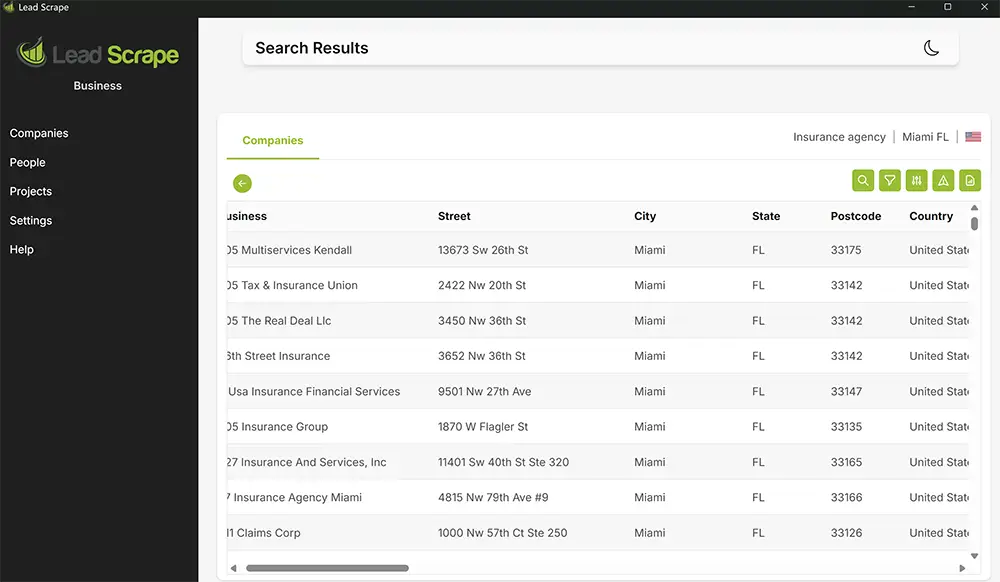
On 7 July 2026 we ran the identical search, insurance agencies in Miami, Florida, through both tools with the same email, contact, and verification options switched on. Outscraper finished in 5 minutes 30 seconds and returned 2,760 rows. Lead Scrape took 5 minutes 12 seconds and came back with 2,569 cleaner rows. On speed and usable result counts they were level, Outscraper delivered a few more results, but after verification about 150 of those were duplicates, so the final numbers were nearly identical.
In Outscraper we opened the Google Maps scraper, typed "insurance agency" as the category, set the location to Miami, Florida, and switched on the emails-and-contacts and verification options so both tools were doing the same work. Lead Scrape got the same industry and city with email extraction and verification enabled, and we let each one run to completion.
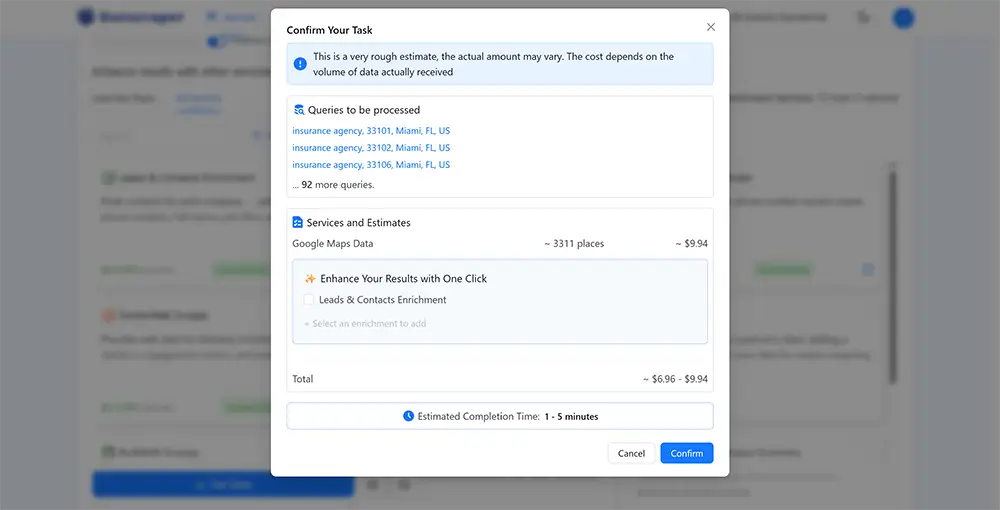
Outscraper quotes you a cost before it runs anything. For this search it came back with roughly $9 for data-only results, the figure in the screenshot below. Adding the emails, contacts, and verification we actually wanted, took the real total to about $20 for that single search.
Lead Scrape ran the same search and dropped the results straight into the app. There's no estimate to approve first and nothing charged per record. The grid below is the actual output: 2,569 Miami insurance businesses with street, city, postcode, and country, ready to filter and export.
| Metric | Outscraper | Lead Scrape |
|---|---|---|
| Run date | 2026-07-07 | 2026-07-07 |
| Time to complete | 5 min 30 sec | 5 min 12 sec |
| Speed difference | 18 seconds, Lead Scrape faster | |
| Results returned | 2,760 results | 2,569 results |
| Duplicate or off-target rows | More (several duplicates and non-insurance listings) | Fewer (deduplicated, on-target) |
| Cost, data only | ~$9 (this one search) | Included |
| Cost with emails, contacts, verification | ~$20 (this one search) | Included |
| Effective data-only rate | ~$3 per 1,000, in line with the advertised base | $0 marginal |
| Annual cost | Pay-per-search, stacks with every run | $247 / year, unlimited |
Times and result counts recorded from the two runs on 2026-07-07. Counts shift with time of day and how wide the location radius is set, so this is one representative run and your own numbers will differ.
On cost, our single Miami search ran about $9 for data alone, and roughly $20 once we added the emails, contacts, and verification that make a list worth using. Against Lead Scrape's $247 for the whole year, that one enriched search costs roughly what a month of unlimited scraping does. If you only run a search or two a year, of course, you would never get close to the flat fee's value in the first place. Run the same Miami search once a week and Outscraper bills about $1,040 over twelve months against the same $247.
Eighteen seconds apart on a five-and-a-half-minute job is noise, so speed was a tie. Volume looked like an Outscraper win at first, 2,760 raw rows against Lead Scrape's 2,569, but that lead thinned out on inspection. Outscraper's set carried more duplicates and a handful of businesses that weren't insurance agencies at all, while the Lead Scrape rows came back deduplicated and on-target. After dedupe the usable counts were near identical.
The estimate and the final pull didn't match, which matters if you're budgeting from the quote. Outscraper said about 3,311 places, the finished job returned 2,760, and that is a gap of roughly 17%, so a year of scraping budgeted off that quote starts a fifth too high. We only ran the job the once, so we can't say whether 17% is typical or just a bad draw.
Outscraper vs Lead Scrape: A Category-by-Category Scorecard
These six criteria come up in pre-sale questions more than anything else. We scored them in words rather than stars, which go stale inside six months.
| Category | Outscraper | Lead Scrape | Edge |
|---|---|---|---|
| Ease of use | No-code cloud dashboard, nothing to install, though the options and credit counters take a moment to learn | Desktop app with a search-and-filter grid, straightforward once installed | Even |
| Data quality | Accurate Google Maps listings, but our run carried more duplicates and off-target rows | Deduplicated, on-target rows drawn from multiple B2B directories | Lead Scrape |
| Pricing transparency | Rates are published, but the final bill depends on enrichment volume and is only known after a run | One flat number, known up front, every feature included | Lead Scrape |
| Support responsiveness | Support is the first thing the five-star reviews mention, and it turns up about as often in the one-star ones | Fast email support and live online chat | Even |
| Integrations | Broad REST API and webhooks, but no built-in CRM connectors | Native connectors for HubSpot, GoHighLevel, Pipedrive, Instantly, Smartlead, Lemlist, Umbrella, and Woodpecker | Depends on need |
| Speed | 5 min 30 sec on our Miami test | 5 min 12 sec on the same test | Even |
Usability, support, and speed are close enough to call even. Lead Scrape takes the two categories where the gap is visible: cleaner data and a bill you know in advance. If your team works inside a CRM all day, the native connectors matter more than anything else in the table, though Outscraper's API will get you further when you are building your own pipeline.
Where Outscraper Genuinely Wins
Outscraper's REST API is deep and well-documented, and the webhook callbacks are a real help if you're assembling a pipeline of your own. The endpoint catalog also reaches past business listings into Google Reviews, Google Search, and Google Shopping. Want review text or shopping data sitting next to company records? Lead Scrape doesn't cover that ground at all. Outscraper also bills per result with no annual commitment, which makes it the sensible pick for a one-off project or the occasional low-volume scrape where a full year of anything would sit idle.
Who Should Use Which Tool?
Outscraper is the better buy if you scrape occasionally, stay under about 7,000 results a month, and want to work in a browser with nothing to install. Developers wiring up a custom pipeline through the REST API are the other clear fit. The endpoint catalog covers Maps, Search, Reviews, and Shopping, and the webhook callbacks save you writing a polling loop.
For anyone scraping every week, or anyone who needs the cost pinned down before the year starts, Lead Scrape is the cheaper answer, more so if you want the emails, SEO stats, company size, and tech stack data already sitting in the file. Agencies, B2B sales teams, and freelancers selling lead lists tend to buy it because $247 in January covers the whole year and the budget line stops moving after that. It runs on your desktop, so the data stays on your machine.
Is Lead Scrape a Good Outscraper Alternative?
For teams that scrape regularly, yes. You pay a flat $247 a year instead of paying per result, and email extraction, email verification, tech stack detection, company size data, and SEO metrics are all part of that. It pulls from multiple business directories, widening coverage beyond Google Maps, and it ships with built-in CRM integrations for HubSpot, GoHighLevel, Pipedrive, Instantly, Smartlead, Lemlist, Umbrella, and Woodpecker. Download the free trial and run your own search through both.
What Are the Best Outscraper Alternatives in 2026?
The strongest Outscraper alternatives in 2026 are Lead Scrape for flat-rate B2B lead lists, Apify for developers who want a scraper marketplace, and the free Instant Data Scraper extension for one-off pulls. Each is compared below.
- Lead Scrape: a desktop app on a flat $97 or $247 a year with unlimited searches, verified emails, tech stack data, and CRM integrations all bundled in. With no per-record charge, the cost per lead keeps dropping the more you scrape. It suits B2B sales teams, agencies, and freelancers who prospect week in, week out.
- Apify: a marketplace hosting thousands of community and official scrapers, with its Google Maps actor on pay-per-event billing at $4 per 1,000 places on the standard rate, enrichment events extra, per the actor pricing page (standard rate as of October 2026). Developers who want to mix and match scrapers across many sites get the most out of it, and it beats Lead Scrape outright if your pipeline has to run unattended or reach sites beyond business directories. We put the two side by side in our Apify vs Lead Scrape comparison.
- Instant Data Scraper: a free Chrome extension that grabs whatever table or list is sitting on the page in front of you. Fine for tiny, one-off pulls where paying for anything feels silly.
- Apollo, Wiza, and Lusha: LinkedIn-first prospecting databases built to find named people at known companies. They don't cover local business listings, so most teams end up running one of these and Lead Scrape side by side. If Apollo is on your shortlist, see the best Apollo.io alternatives.
Outscraper Review Summary: What Real Users Say
Trustpilot is the only platform with enough Outscraper reviews to draw a pattern from, and on 1 August 2026 it showed 4.4 out of 5 from 283 of them. The split is barely a curve: 249 five-star, 26 at one or two stars, and 8 in between. Praise in the five-star reviews concentrates on setup speed, throughput on big Maps jobs, and support that replies within hours.
We read the negative ones. Billing surprises dominate, including a June 2026 reviewer who described prepaid credits as giving a "false sense of confidence the product is pre-paid" before the month's overage hit the card on file. Support turns up in the complaints about as often as it does in the praise, so the experience clearly varies. Data quality is inconsistent too, with one July 2026 reviewer reporting 30 unique, usable rows out of 287 results returned.
Outscraper's G2 listing is no use as a cross-check either, carrying 4 reviews at 4.9 out of 5, too small a sample to read anything into it.
Outscraper vs Lead Scrape: Pros and Cons
Outscraper Pros
- Cloud-based, accessible from any browser without installing software
- Strong API for developers building custom data pipelines
- Pay-as-you-go model suits very low volume, occasional scrapes
Outscraper Cons
- Costs escalate quickly at moderate-to-high volume (30,000 results/month = $1,080+/year per published pricing)
- Email enrichment, contact details, and company data are paid add-ons
- The final bill is only known after the run, and our own quote overshot the actual result count by 17%
- Limited to Google Maps as a primary data source
Lead Scrape Pros
- Flat $247/year for unlimited scraping with no usage caps
- Emails, tech stack, company size, and SEO stats are all included, with revenue in the Business edition
- Built-in email verification runs as part of the scrape, so it flags invalid addresses before you export
- Desktop app keeps all data on your machine with no cloud storage concerns
- Direct CRM integrations with HubSpot, GoHighLevel, Pipedrive, Instantly, Smartlead, Lemlist, Umbrella, and Woodpecker
- Pulls from multiple business directories for broader data coverage
Lead Scrape Cons
- Desktop-only application (requires Windows or Mac)
- Nothing to log into from a phone or a borrowed laptop
- Annual subscription required (no pure pay-per-result option)
Common Questions About Outscraper
Is Outscraper legal?
Outscraper extracts publicly accessible data from Google Maps and other Google services, which is generally legal in most jurisdictions as long as the source data is not behind a login. The compliance side is on you though. GDPR, CCPA, and the source sites' terms of service all still apply to what you do with the data afterwards. Our guide to the legal and ethical side of web scraping for lead generation covers the hiQ Labs v. LinkedIn ruling and what GDPR means for cold outreach to scraped contacts.
What is the difference between Apify and Outscraper?
Apify goes horizontal. It hosts thousands of third-party scrapers across many sites, and its Google Maps actor bills per event, charging $4 per 1,000 places at its standard rate and metering any enrichment on top. Outscraper is the narrower of the two, building and maintaining its own scrapers aimed squarely at Google services, at $3 per 1,000 base results. We go deeper on that split in Apify Google Maps Scraper vs Lead Scrape.
How can I extract Google Maps data for free?
- Use Outscraper's free tier. It covers roughly the first 500 places a month.
- Copy listings by hand. Workable for very small lists, straight out of Google Maps into a spreadsheet.
- Self-host an open-source scraper.
None of them scale past a few thousand records without pain. Paid tools like Lead Scrape work out cheaper once you pass roughly 7,000 results a month.
How much does one Outscraper search actually cost?
It comes down to volume and how many enrichments you switch on. When we scraped insurance agencies in Miami, Florida, Outscraper billed about $9 for 2,760 businesses at the base data rate, and close to $20 once we added emails, contact details, and verification. That was one search. Lead Scrape covers that search, and every other one you run that year, inside its flat $247 license.
Sources
- Outscraper official pricing page
- Outscraper customer ratings on Trustpilot
- Outscraper user reviews on G2
- Lead Scrape user feedback on Capterra
- Lead Scrape user feedback on G2
- Search-demand figures: Google Ads Keyword Planner search volume (United States), accessed via DataForSEO on 2026-07-07
About the Author
Shane Daly writes about lead generation and sales technology at Lead Scrape. He has covered marketing and software tools since 2014, mostly on how small teams find and reach B2B buyers, from prospecting and cold outreach through to CRM automation. He's based in Cork, Ireland, and runs the tools he compares before writing a word about them.