


Hand-copying business contacts out of a directory holds up for about a dozen records. Past that you lose your place and start pasting phone numbers into the website column. Bigger jobs need software to extract business contacts for you, reading the listings and writing the fields straight into a spreadsheet. Six tools do that job well. This guide walks through each one, with the pricing taken from the vendors' own pages in July 2026 and the catch that comes attached.
The short answer: buy on volume, not on the feature list. Pulling business contacts out of directories week after week on a fixed budget goes to Lead Scrape, one annual fee, no meter on the searches. Need one person's details now and again and RocketReach costs less. ZoomInfo and Apollo hold the bigger prebuilt databases and the intent signals, if you can absorb what they charge.
A business data scraper is software that pulls structured business records from B2B directories in bulk, then exports them to a spreadsheet or CRM. Those records cover company name, address, phone, website, email, and named contacts.
Best Tools to Extract Business Contacts from Directories
Monthly volume is what decides this. Build lists most weeks and a flat annual fee wins by a distance, which puts Lead Scrape ahead. Credits only win at the other extreme, one or two lookups a month and nothing else. Prices below are from each vendor's own pricing page, checked in July 2026.
| Tool | Best for | Pricing model (as of July 2026) | Key limitation |
|---|---|---|---|
| Lead Scrape | Bulk extraction of business contacts from directories on a flat annual budget | Flat annual license, $97 to $247 per year, unlimited searches, no per-record charge (July 2026) | Desktop app for Windows and macOS only, with no cloud API |
| Outscraper | Occasional pay-as-you-go pulls of business listings and map data | Pay-as-you-go, $3 per 1,000 base records, falling to $1 per 1,000 above 100,000 a month, with emails and verification each billed at $3 per 1,000 on top (July 2026) | Billing stacks per task, so you only know the total once a job has finished. More technical setup than the rest |
| Apollo.io | Searching a prebuilt B2B database with built-in email sequencing | Basic $49 per user per month, Professional $79, Organization $119, billed annually (July 2026) | Per-seat, and Apollo's pricing FAQ confirms an export credit is consumed every time you move a contact outside Apollo |
| UpLead | Verified contact pulls when you want a per-record accuracy guarantee | $74 per month billed annually for 170 credits, with extra credits at $0.60 each (July 2026) | Credit-metered: one credit per revealed contact, so the bill rises with every list you build |
| RocketReach | One-off lookups of an individual decision-maker's email and phone | Essentials $19 per month, $229 billed annually; Pro $52 per month, $619 annually (July 2026) | Essentials is email-only and capped at 1,200 exports a year. Phone numbers need the Pro tier |
| ZoomInfo | Enterprise teams needing the largest database with buyer-intent signals | No public pricing, quote only. Procurement platform Vendr puts the median buyer at $33,500 per year (July 2026) | Negotiated annual contract with credit pools. Vendr records deals ranging from $7,200 to $155,820 |
Apollo, UpLead, RocketReach, and ZoomInfo sell you access to records they already hold, metered by seats or credits, so the more you prospect the more you pay. Lead Scrape and Outscraper go and fetch the data when you run the search. Of the six above, only Lead Scrape charges the same whether you run one search this year or a thousand.
Vendr negotiates software contracts on behalf of buyers, and its ZoomInfo page records deals landing anywhere between $7,200 and $155,820 a year for the same product, a spread of more than twenty times between the two ends. Seat count and credit pool size move the number, so the bill tracks how much prospecting you do.
What Contact Data Can You Extract?
An email address on its own does not get you far. A directory extractor pulls the email and the phone number along with the whole company record they sit inside, plus the named people attached to it. Lead Scrape gathers up to roughly 50 data points per business across two views, Companies and Contacts, so you finish with the organisation and the people inside it.
The list below reads shorter than it is. Switch on SEO data or technology stack and either one returns more than ten separate fields on its own.
- Company or business name
- Full street address
- Phone number
- Website URL
- Email addresses, verified as they are collected
- Contact name and job title
- LinkedIn profile URL for the contact
- Social media profiles (Facebook, X, Instagram)
- Business category
- Review ratings and follower counts (Business edition)
- SEO metrics and technology-stack signals
A company listing tells you where to phone and not much else. The Contacts tab adds a person to address by name, their job title, a verified email, and a LinkedIn profile you can read before you get in touch. The full field breakdown is on the Lead Scrape features page.
How to Pull Contact Details in Bulk
To extract company contact details in bulk, pick an industry, set a country and city, switch on the emails and contacts option, run the search, then filter and export. Lead Scrape merges the matching records from multiple B2B directories, strips the duplicates, and writes the rows you can see to CSV, Excel, or JSON.
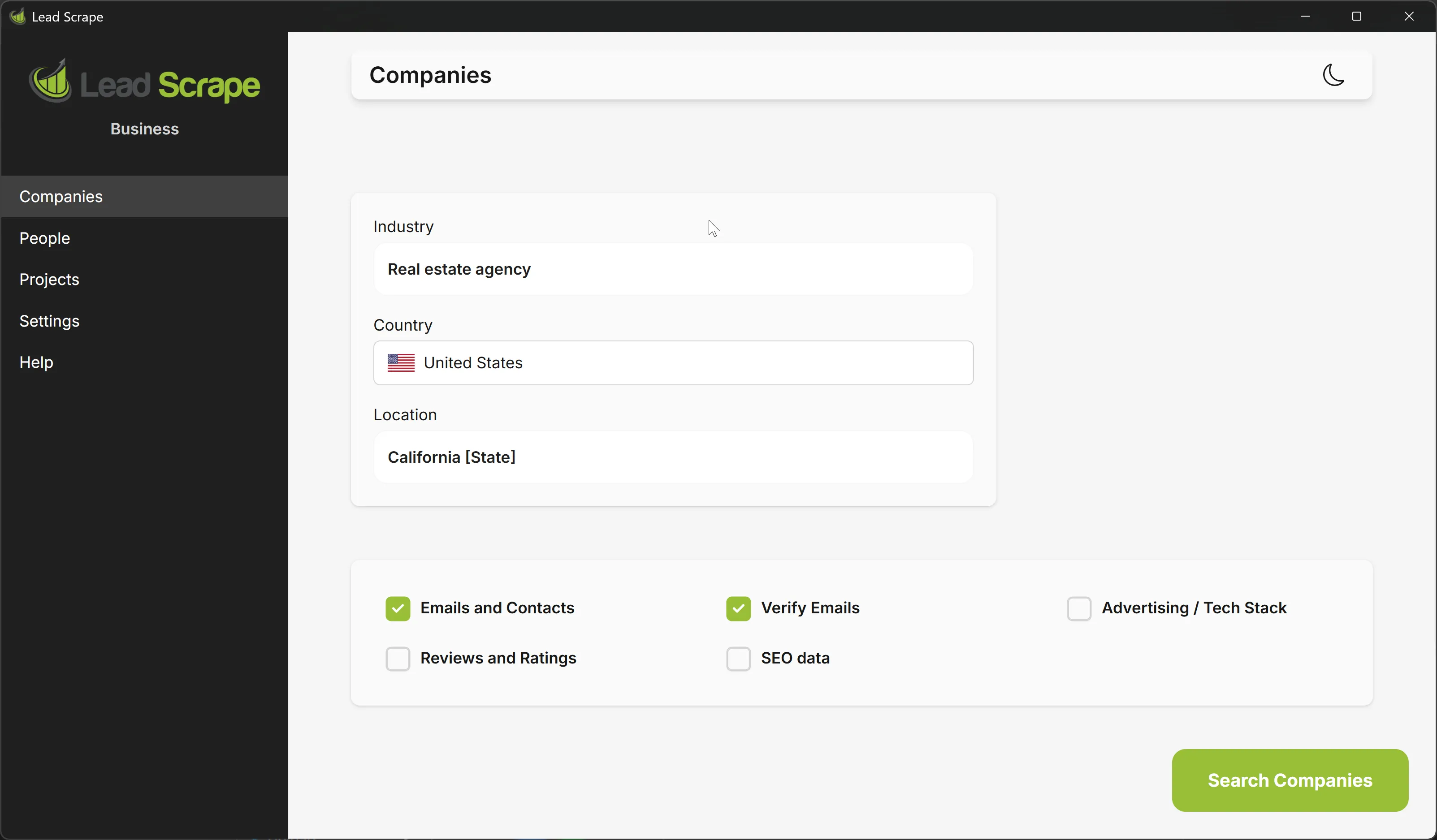
- Choose an industry. Type it into the search box and pick a suggestion or enter your own.
- Set the location. Choose a country and city. The Business edition can take a whole state or region in one run.
- Turn on Emails and Contacts. This tells the tool to collect named people and their emails, not just company listings.
- Run the search. Lead Scrape gathers matching records from multiple B2B directories, merges them, and removes duplicates so you are left with one clean set.
- Filter, then export. Narrow the list, then export the visible rows to CSV, Excel, or JSON.
Quick filters narrow every column as you type. Advanced filters chain conditions with AND or OR logic, and the company filters can be pushed across to the contacts so both views stay in step. Business handles bulk searches too. Upload up to 250 cities or industries in one file and leave it to work through the queue.
Volume depends on which edition you are running. Standard reads three B2B directories, Business reads seven and merges them, and the counts show the gap plainly enough. Restaurants in San Diego comes back at roughly 1,500 records on Standard and about 4,000 on Business, deduplicated into one list.
Can You Export Business Contacts to CSV or Excel?
Yes. CSV, Excel, or JSON. The export is context-aware, so it writes only the rows and columns you have filtered and left visible, in the order you arranged them. Open the file and it is already the list you built, with nothing to delete and no headers to drag around first.
Exporting a file is only one route out. Lead Scrape pushes contacts straight out to HubSpot, Pipedrive, GoHighLevel, Instantly, and Smartlead, with outbound webhooks for Zapier, Make, and N8N, so a finished list can reach a CRM without a CSV in between. See our integrations page.
Directory Extractor vs. Business Contact Finder vs. Lead Extractor
People use these three names interchangeably and they are not the same job. A directory extractor like Lead Scrape pulls full company and contact records in bulk. Ask a business contact finder for the same thing and you get one address at a time, for a person you can already name, which our email finder tools comparison goes through. Lead extractor is the umbrella term the whole category sits under, explained in our lead extractor guide. If you are building a list and not chasing down one named person, the directory extractor is the one you want.
Free vs. Paid Business Data Scrapers
Look at the pricing model before you look at the price. A free scraper has no license fee and still costs you a weekend of setup and a proxy bill. Credit-based databases look cheap at the entry tier, then climb in step with how much prospecting you do.
Is There a Free Business Contact Extractor?
No free tool does this job end to end. Open-source and no-code scrapers such as Scrapy, Octoparse, and Apify cost nothing to start, and what you save in licence fees comes back as setup work. You write the extraction rules per site, then rewrite them the next time a site changes its layout, and nothing that comes back is deduplicated or verified unless you do it. Budget a few days for that before you file it under free. A free trial of a paid extractor gets you closer, since it lets you run real searches before you commit.
What 5,000 contacts a month really costs
Say an agency looking after a handful of clients needs 5,000 verified business contacts a month. That is 60,000 records over a year, and the published rates above turn it into the table below. Lead Scrape stays at $97 or $247 for the year whether you pull 600 of those records or all 60,000, because none of it is metered per record. What the flat fee does not get you is a cloud service or an API, and there is no Linux build either.
| Pricing model | Published rate (July 2026) | Effective cost per record | 12-month cost at 60,000 records |
|---|---|---|---|
| Per-credit database | UpLead: Essentials $74 a month (170 credits), Plus $149 (400 credits), both billed annually; extra credits $0.60 and $0.50 | $0.49 to $0.59 | $29,000 to $36,000 |
| Pay-as-you-go extractor | Outscraper: $3 per 1,000 base, plus $3 per 1,000 emails and $3 per 1,000 verification | About $0.01 | Around $540 |
| Flat annual license | Lead Scrape: $97 to $247 a year, unlimited searches | $0.002 to $0.004 | $97 to $247 |
No published UpLead plan carries 5,000 credits a month, and the largest one with a price attached, Plus, includes 400. I could not find a listed tier that covers the volume, so I priced the remaining 4,600 as extra credits at $0.50 each, which is list price. Buy at that scale in practice and the real number is whatever their sales team quotes you.
Pull one list of 5,000 and stop there, and pay-as-you-go wins outright. I make it about $45 for a single job, and no annual license competes with that. Repeat the same list every month and the flat license is the only line on the page that stays still, since $247 covers a year of searches at any frequency while the credit database bills you again for every record, every time. (Illustrative estimate from published list prices, not a quote.)
How Accurate Is Extracted Business Contact Data?
Accuracy depends on whether the tool verifies what it collects, and on how stale the record already was when it reached you. Business contact data rots continuously. People change jobs, companies close, and a list that was clean in January is not clean in December. Checking each address at the moment of extraction keeps that gap small.
ZeroBounce processed more than 11 billion email addresses in 2025 and reports that at least 23% of an email list degrades in a year, an improvement on the 28% it recorded the year before. Most of that is people moving jobs. The US Bureau of Labor Statistics put median employee tenure at 3.9 years in January 2024, the lowest since 2002, with 22% of workers in their current job a year or less.
A stale list costs you more than a poor open rate. Gmail's bulk sender rules require senders to keep the spam rate reported in Postmaster Tools below 0.30%, with 0.10% as the recommended ceiling, and a decayed list walks you toward those numbers quickly. Blow through them and the deliverability damage carries over to campaigns you send weeks later.
Lead Scrape works on both ends of that. It checks every address as it collects it, so nothing arrives needing a cleaning pass first. Each search also reads the B2B directories live rather than replaying a store somebody last refreshed months ago, and skipping that second part is how a very large database fills up with dead rows.
Which Business Data Scraper Should You Choose?
Work backwards from how often you buy data. Pull lists most weeks and a flat annual license is the cheapest structure going, which means Lead Scrape, Business edition if you want named people and not just company listings. Credits are cheaper for someone who looks one person up twice a month, and RocketReach handles that. Apollo and ZoomInfo earn their price when you specifically need buyer-intent data.
Serve several clients at once and metered pricing sends its largest invoice in your busiest month, which is exactly backwards. A flat license does not move while you run a fresh search per client, and since the export writes only what is on screen, each client handoff comes out as a finished file with nothing to tidy first.
A sales team working a single territory usually wants Business for the contact side, since one region run comes back with several thousand deduplicated records and a named person on most of them. It does not do buyer-intent scoring. If that is the gap you are trying to close, Apollo and ZoomInfo are worth their usage-linked price.
None of that applies if you just want one decision-maker's email every few weeks. A per-credit business contact finder such as RocketReach beats any subscription there, because you pay for the lookups you actually make and nothing else. Our email finder tools comparison covers that case.
Is It Legal to Scrape Business Directory Data?
Scraping publicly listed business directory data is generally lawful in the United States. The rules bite on what you do with it afterwards. The GDPR, the CCPA, and each source's terms of service draw the boundaries. Business data carries fewer restrictions than personal consumer data, and you still need a lawful basis to contact people and must honour opt-out requests.
The sending side carries the harder rules. The FTC is explicit that the CAN-SPAM Act makes no exception for business-to-business email. A cold email to a company address still needs accurate headers, a valid physical postal address, and a working opt-out honoured within 10 business days, with penalties up to $53,088 per offending message. Stick to public listing data and spend your compliance effort on how you send.
For the full picture, including what the hiQ Labs v. LinkedIn ruling settled about scraping public data, read our guide on web scraping for lead generation and what is legal.
Bottom line: the billing model matters more here than the feature list. Pull lists from directories all year and a flat annual license like Lead Scrape holds the bill still while your volume climbs. Per-credit pricing genuinely wins in one narrow case, the occasional single lookup, which is RocketReach territory. Intent data is the one thing a flat license will not buy you, and that is what ZoomInfo and Apollo charge by the record for.